

FS-ISAC Security Tips Newsletter | September 2025 | Issue No. 25
Baseline Recommendations for the Cloud
If you have a personal computer, mobile phone, or tablet, you’re probably storing data. According to industry sources, people use an average of 20 gigabytes (GB) of data on their devices and store 500GB on a personal cloud. Considering that a photo is about five megabytes (MB) – one GB is equal to 1024 MB – you likely have a lot of bytes in the form of images, videos, documents, and music stored in the cloud. And you probably want to keep every byte safe, especially the ones storing your financial information.
Average Consumer Data Consumption
- “The average person uses about 20GB of data per month.” (Mint Mobile)
- “On average each photo requires 5MB of storage.” (Samsung)
- “The average person stores about 500 GB of data in personal cloud storage.” (pCloud)
Securing Data in the Cloud
To secure the data you store, most cloud providers operate on a shared responsibility model. This is how it works: your cloud service provider handles security threats related to the cloud and its infrastructure while you watch out for your data and other assets stored in the cloud. This model ensures that your stored data can withstand a cyber incident and that you can access your data if any of your backed-up devices are irretrievably damaged.
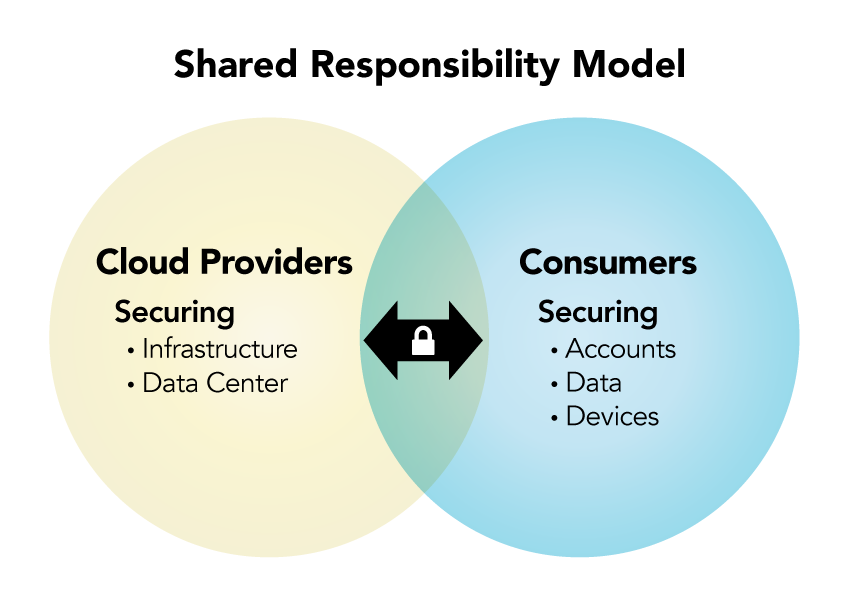
To hold up your end of the shared responsibility model, follow these baseline standards.
First, use a combination of strong, unique passwords and enable MFA for all cloud accounts to prevent unauthorized access.
Second, use antivirus and other security software to protect your devices. Avoid unsecured Wi-Fi networks.
Third, take the time to understand and use encryption so hackers can’t access it in the event of a breach.
Fourth, regularly inspect and back up your data to the cloud, and make sure you can view and/or access it.
Fifth, review the access capabilities you’ve established that let others view your data and update it to reflect lifestyle changes (e.g., marriage).
Sixth, pay attention to current events and notifications from your provider about security incidents. Stay informed about cloud security recommendations.
Does That Data Need to Be in the Cloud?
Finally, not everything needs to be stored in the cloud. As it relates to financial data in particular, prioritize information by determining its value, the damage caused if it were lost, and how long it would take you to recover it, e.g., contacting your financial institution, closing/opening new accounts, financial loss, credit bureau restoration, etc.
If You’re a Victim?
Immediately change any passwords you might have revealed. Consider reporting the attack to IC3.gov and the police and file a report with the Federal Trade Commission.
Getting Help
If you identify suspicious activity involving your financial institution, contact them immediately.
©FS-ISAC 2025. 12120 Sunset Hills Rd, Reston VA 20190.